Admin Guides / Collections and entitlements
Entitlements
Set up each piece of access people can ask for: its owner, plain name, risk, dependencies, replacements and lifecycle.
An entitlement is one piece of access a person can hold. You review entitlements in step 7 of Collection Onboarding, and change them later from the entitlement record in the Admin Workspace (Catalog > Entitlements).
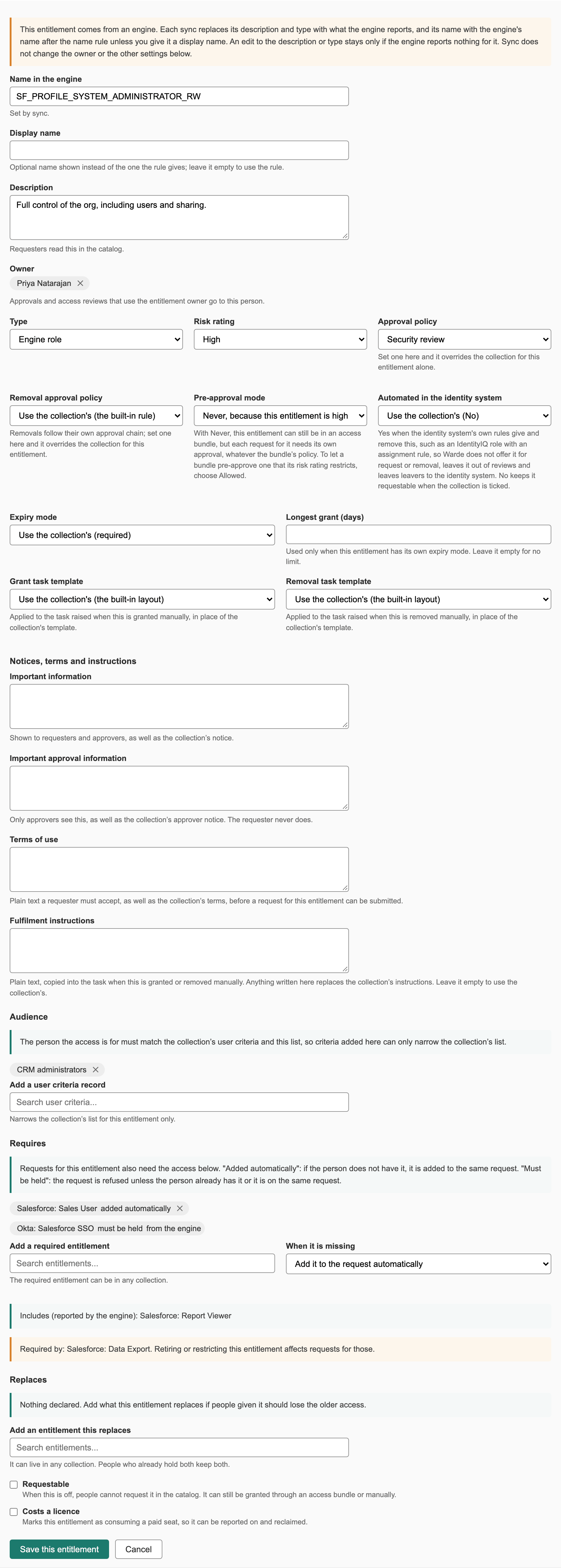
The fields people see
| Field | What it does |
|---|---|
| Name | The name requesters see beside the collection's. For access from an engine, it is the engine's name after any name rule, or the display name when one is set. |
| Display name | Optional. A name of your own, shown instead of the one the rule gives. |
| Description | What the access lets someone do, in plain words. Requesters read it in the catalog, and reviewers see it. |
| Owner | The person who owns this access. Approval rules and access reviews can send work to them. Where the engine reports an owner, each sync sets this back to that person. |
| Risk rating | Low, Medium or High. Reviewers see it, and high-risk access is not pre-approved into bundles unless pre-approval is set to Allowed. |
| Licensing bound | Whether each grant uses a paid licence. Requesters and reviewers see a "costs a licence" tag. |
| Important information | A notice shown to requesters on the form and to approvers. Shown alongside the collection's notice. |
| Important approval information | A notice for approvers only. Shown alongside the collection's. |
| Terms | Terms the requester must accept. Shown alongside the collection's terms. |
The fields that control requests
| Field | What it does |
|---|---|
| Requestable | Whether people can ask for it in the catalog. An entitlement that is not requestable can still be part of an access bundle. |
| Available for | User criteria that narrow the collection's audience. Empty uses the collection's. |
| Approval policy, removal approval policy | Empty uses the collection's policy, then the instance default. See Approval policies. |
| Pre-approval mode | Allowed or Never. Never means each bundle request that includes it also runs this entitlement's own approval. Empty follows the collection, or Never for high-risk and licence-bound access. |
| Expiry mode, expiry max days | Optional, Required or Disallowed. Empty uses the collection's. The maximum applies only when the mode is set here. |
| Automated in the identity system | Yes when the identity system's own rules decide who has this access. Warde then leaves it out of requests, removals, reviews and leaver removals. Empty follows the collection. |
| Fulfilment instructions, task templates | For manual grants and removals. Replace the collection's. |
What the engine sets
These come from the sync and are read-only in practice: Name in the engine, Native ID, Native type, Native value, Type (entitlement, group, engine role, access profile, licence or PIM-managed group), Binding (the engine source it comes from) and Fulfillable (whether the engine can grant it; if not, every change is a task).
An entitlement you add by hand has no binding or native ID, and is always granted and removed through a manual task.
Plain names
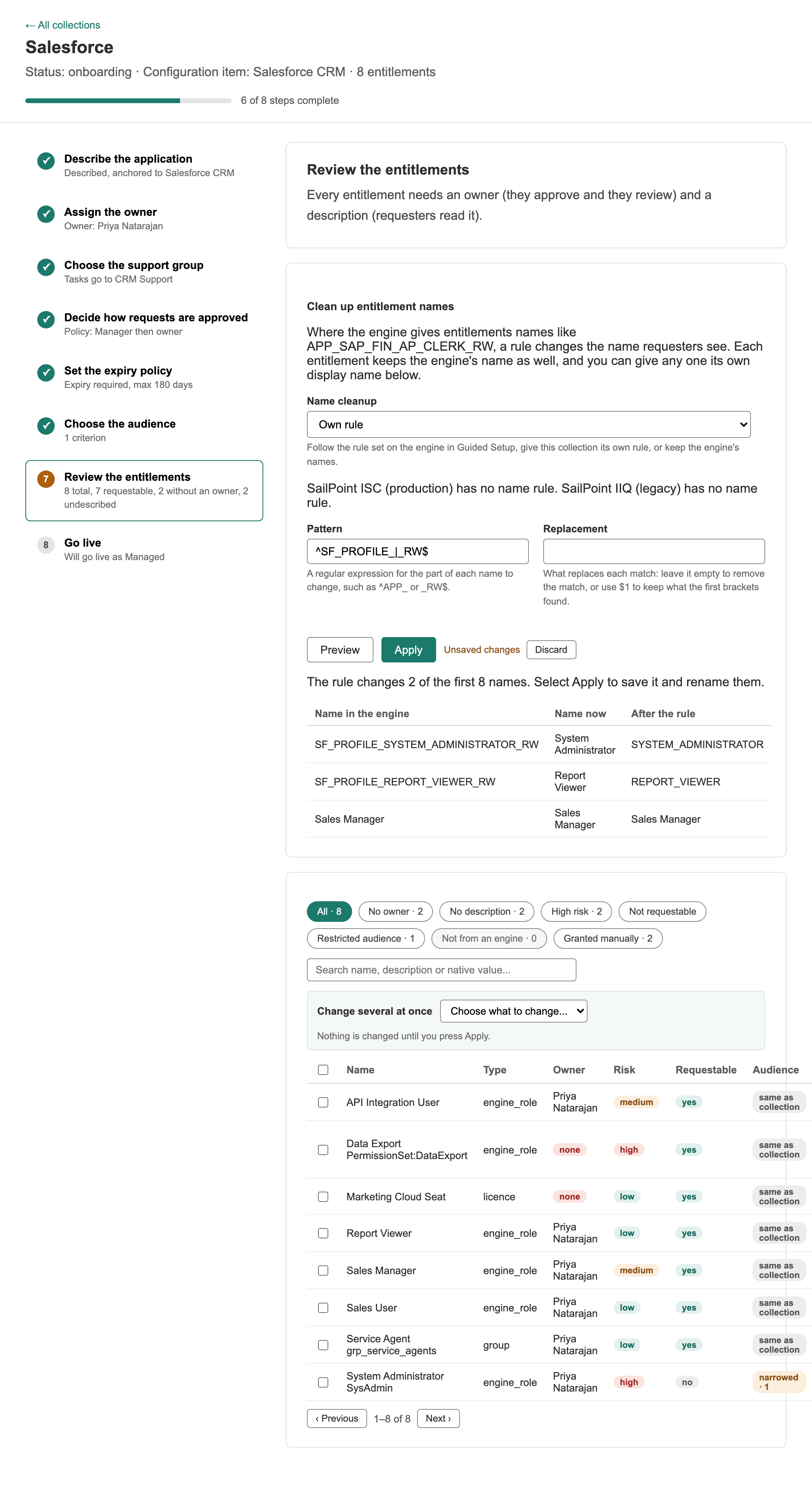
Engines often name access in ways nobody outside IT can read, such as CN=APP-FIN-GL-RO,OU=Groups,DC=example,DC=com. Give the engine a name rule, a pattern and a replacement, on the engine form under Entitlement names, and a collection can override it. The rule rewrites the name people see on every entitlement from that engine; the engine's own name is kept beside it.
To apply a rule to one collection, select Clean up entitlement names at the top of step 7 in Collection Onboarding. To name a single entitlement by hand, set its Display name.
Access that needs other access
Some access only works with other access, for example a reporting role that needs a base login. On the entitlement's drawer in Collection Onboarding, add it under Requires. When someone asks for the entitlement, Warde adds what it requires to the same request, shown to the requester as "Also added, because it needs them", for the same people and with the same end date. When access is removed, the removal form shows what goes with it.
What an entitlement contains in the engine, such as the groups an access package delivers or the entitlements an ISC role carries, is read from the engine and shown as links you do not edit. A review then shows the package or role rather than its parts.
Access that replaces other access
When a new entitlement supersedes an old one, add the old one under Replaces on the new entitlement's drawer. When someone is granted the new entitlement, Warde removes the old one from them once the new access is in place. The removal needs no approval of its own; approvers see the replaced access in their notice. Warde refuses the old entitlement to anyone who already holds the new one, and a bundle cannot carry both.
Retiring access
| Lifecycle state | Meaning |
|---|---|
| Active | In normal use |
| Deprecated | Being phased out. It cannot be requested or added to bundles. |
| Retired | It can no longer be granted |
Retiring an entitlement with requests still in flight tells you how many and links the list. Nothing in flight is cancelled.
When an engine stops reporting an entitlement, a full sync records it as Absent since that run. If it stays missing past the grace period (x_66256_warde.sync.reconcile_grace_hours, 168 hours), Warde retires it. An entitlement you added by hand is never retired by a sync.
Entitlements to look at
| Workspace list | Why |
|---|---|
| Catalog > Entitlements: unmanaged | Access no engine fulfils, so every change is a task |
| Data quality > Entitlements with no owner | Nobody to approve its place in a bundle or review it |
| Data quality > Requestable but not fulfillable | People can ask for it, but nothing can deliver it |