Admin Guides / Collections and entitlements
Guided questions
Help requesters find the right access in a large collection by answering a few questions instead of searching.
A large collection can hold hundreds of entitlements that look alike to a requester: a shared drive per office, a cost centre role per team. Guided questions narrow the list. When a requester picks the collection on the Request Access form, Warde asks up to four questions, such as "Work location" or "Cost centre", and shows only the entitlements that fit the answers.
Questions only narrow the list. Whether something can be requested still depends on Requestable, its lifecycle state and its audience.
What the requester sees
- They choose the application under All applications. Collections with questions carry a "has questions" tag.
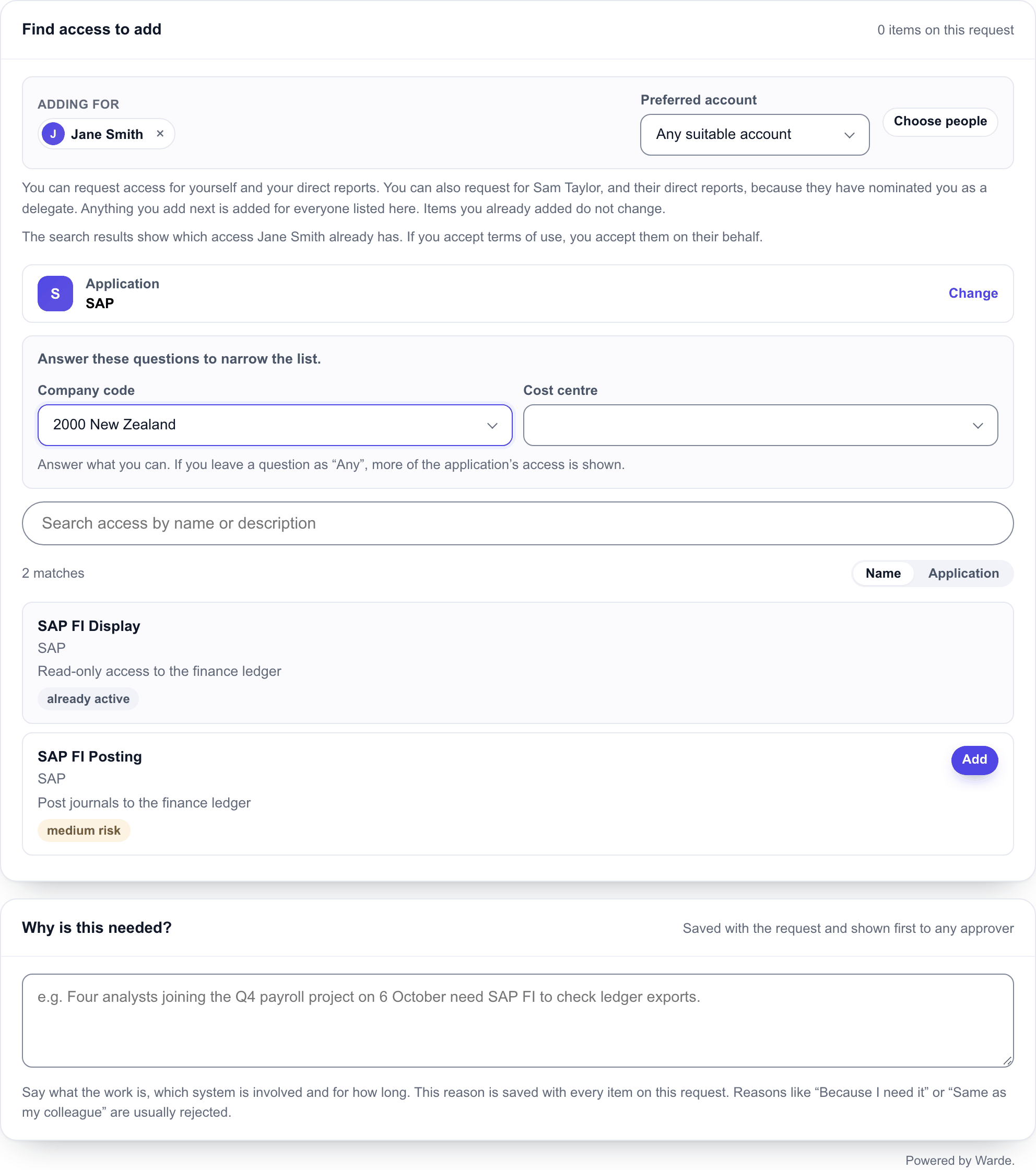
- The form says "Answer these questions to narrow the list." and shows one drop-down per question. The empty answer is Any.
- A follow-up question appears once the question it depends on is answered, whether the requester chose the answer or Warde filled it in from the default path. Changing an answer clears every follow-up under it, including follow-ups of follow-ups.
- The list shows only matching entitlements. A question left as Any shows more of the application's access.
Each item added to the request keeps the answers it was chosen under.
Set up questions
Questions are always written by you; a sync never creates them. Open the collection in the Admin Workspace and add rows to its Discovery Dimension related list, or open Guided discovery > Dimensions.
| Field | What to enter |
|---|---|
| Label | The question as the requester sees it, such as Work location |
| Collection | The collection that asks it |
| Order | Where it appears. Only the first four active questions that have answers are shown. |
| Source table | Where the answers come from, such as cmn_location or cmn_cost_center. Leave empty to use static options. |
| Source query | An encoded query that limits the rows offered. Empty offers every row, up to 200. |
| Static options | A fixed list of answers as JSON value and label pairs, such as [["apac","Asia Pacific"],["emea","Europe"]]. Ignored when a source table is set. |
| Default path | A field on the person the access is for that fills in the answer, such as location or department. Used only when that value is one of the answers. |
| Depends on | Makes this a follow-up to an earlier question in the same collection. Its source query can use ${parent} for the earlier answer. Needs a source table. |
| Active | Inactive questions are not asked |
A question whose answers cannot be worked out is skipped rather than shown empty.
Map answers to entitlements
Tell Warde which answers lead to which entitlements. On the entitlement's Entitlement Dimension Mapping related list, or under Guided discovery > Answer maps, add a row for each answer:
| Field | What to enter |
|---|---|
| Summary | Filled in for you from the question and the answer, and used as the row's name |
| Entitlement | The entitlement offered for this answer |
| Dimension | The question. It must belong to the entitlement's own collection. |
| Value | The answer: the record's sys_id for a question drawn from a table, or the choice value for static options |
| Value display | The answer's name, kept so the list stays readable if the record is renamed |
| Active | Inactive mappings are ignored |
The rules for matching:
- several rows for one question are alternatives: Melbourne or Sydney;
- rows for different questions must all match: Melbourne and Finance;
- an entitlement with no rows for a question matches any answer to it.
The mapping table has plain columns, so a long list can be loaded with your own import set.
A worked example
The Enterprise Applications collection asks two questions. Work region has a fixed list of answers. Cost centre is drawn from the platform's cost centre table and filled in from the person's own cost centre.
| Label | Collection | Order | Source table | Source query | Static options | Default path | Depends on | Active |
|---|---|---|---|---|---|---|---|---|
| Work region | Enterprise Applications | 100 | - | - | [["apac","Asia Pacific"],["emea","EMEA"],["amer","Americas"]] | - | - | Yes |
| Cost centre | Enterprise Applications | 200 | cmn_cost_center | - | - | cost_center | - | Yes |
The answer maps for four of its entitlements. A Cost centre value is the sys_id of the cost centre record; a Work region value is the value from the fixed list.
| Entitlement | Dimension | Value | Value display | Active |
|---|---|---|---|---|
| SAP FI Display | Work region | apac | Asia Pacific | Yes |
| SAP FI Display | Cost centre | sys_id of 4100 | 4100: Finance | Yes |
| Workday HR Administrator | Cost centre | sys_id of 4100 | 4100: Finance | Yes |
| Workday HR Administrator | Cost centre | sys_id of 5200 | 5200: People & Culture | Yes |
| SAP Payments Approver | Work region | apac | Asia Pacific | Yes |
| SAP Payments Approver | Work region | emea | EMEA | No |
Legacy Claims Desktop has no rows.
What the requester is then offered:
| Work region | Cost centre | Offered | Why |
|---|---|---|---|
| Asia Pacific | 4100: Finance | All four | SAP FI Display matches both answers. Workday HR Administrator matches the cost centre and has no Work region rows. SAP Payments Approver matches the region and has no Cost centre rows. Legacy Claims Desktop has no rows. |
| EMEA | 4100: Finance | Workday HR Administrator, Legacy Claims Desktop | SAP FI Display is mapped to Asia Pacific only. SAP Payments Approver's EMEA row is inactive, so only its Asia Pacific row counts. |
| Any | 5200: People & Culture | Workday HR Administrator, SAP Payments Approver, Legacy Claims Desktop | Work region is left as Any, so it is ignored. SAP FI Display is mapped to 4100 only. |
| Americas | Any | Workday HR Administrator, Legacy Claims Desktop | SAP FI Display and SAP Payments Approver are mapped to other regions only |
If every row an entitlement has for a question is inactive, it counts as having no rows and matches any answer to that question. The collection's other entitlements, with no rows at all, are offered whatever the answers.
Request posture
Each collection has a Request posture on its record:
| Posture | Effect |
|---|---|
| Search and guided (default) | Its access appears in a plain search across all applications, and through its questions once the collection is chosen |
| Search only | The same as Search and guided |
| Guided only | Its access is left out of a search across all applications, and appears only once the requester chooses the collection |
Use Guided only for a collection whose entitlements only make sense once the questions are answered. The questions themselves appear whenever the chosen collection has active questions, whatever its posture.
Find collections with questions
Guided discovery > Collections using discovery lists collections with at least one active question. The Access health dashboard's collection tab charts collections by request posture.