User Guides / Using Warde
Check how a request is going
Where to see how your request for access is going, what each stage means, and what tells you when something changes.
After you submit a request, there are two places to follow it: My Access and your requests list in Employee Center. Both show the request number, such as RITM0012345, so you can quote it to your service desk.
On My Access
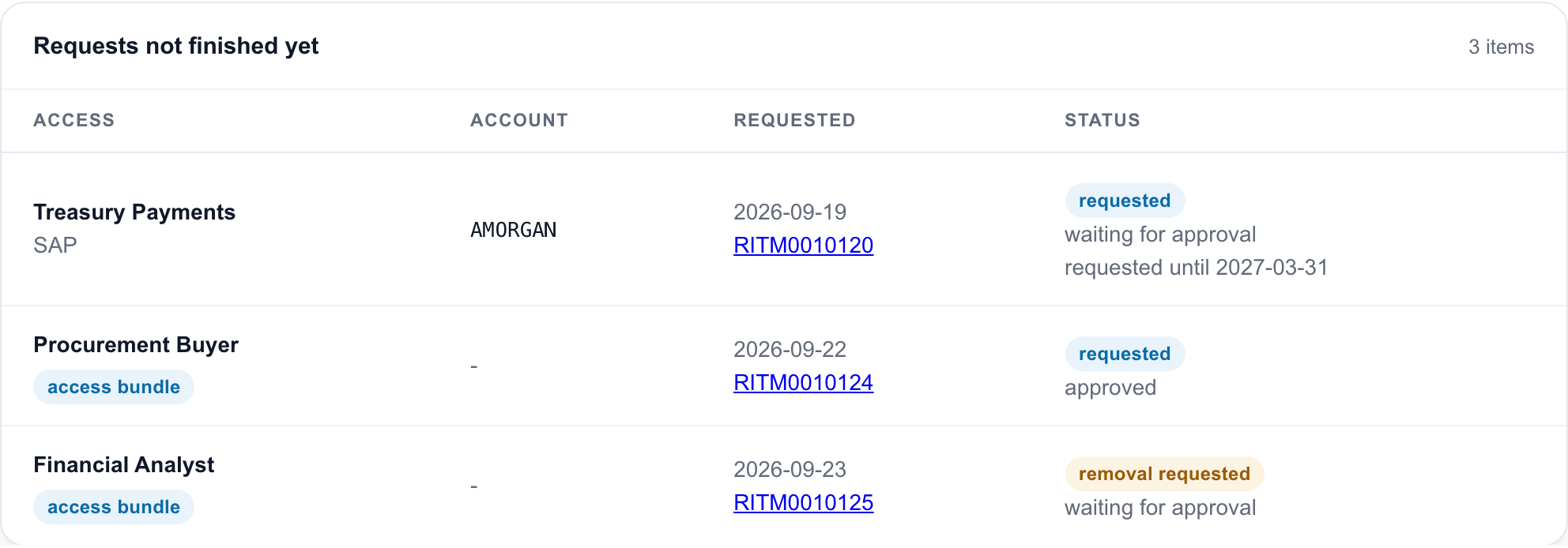
Each row shows:
| Column | What it shows |
|---|---|
| Access | The access or bundle you asked for, and its application |
| Account | The account it goes on, or - when there is no particular account |
| Requested | The date you asked, and the request number. Select the number to open the request. |
| Status | requested or removal requested, then where it has got to: waiting for approval or approved. An end date you asked for shows as requested until and the date. |
Once the work starts, the row moves to the Access panel. There it reads being added or being removed, with the request number and in progress under it. When the work is done, the access shows as active, or leaves the list if it was removed.
If you manage people, expand a person on the My team tab to see the same panel for them.
In Employee Center
Warde names each request for what it asks, such as "Access requested: SAP FI Posting", "Access for Jane Smith: SAP FI Posting" or "Access bundle for 3 people: Payroll Officer".
The stage on the request page tells you where it is:
| Stage | What is happening |
|---|---|
| Waiting for Approval | The approvers are deciding. Everyone on the request is approved or rejected together. |
| Fulfillment | It is approved, and the access is being set up by your identity system or by the team that owns the application |
When everything is finished, the request closes. Its last comment says it is complete, or which items could not be done and why.
The comments on your request
Warde writes comments on the request at the points where something changes for you:
- when you submit, anything that was not requested and why, and any access the request replaces;
- if your request is checked for access conflicts first, that the check is running, and its result for each item;
- if nobody can approve it, the reason. Ask your service desk for help;
- if it is rejected, "This request was not approved.";
- when it closes, what was added or removed, and anything that could not be done.
Nothing is written when the request is approved or when the work starts. The stage changes instead.
How long it takes
The form tells you how long the access takes after approval, before you submit, such as "Available within 2 business days of approval". That time starts when the last approver responds. It does not include how long approval takes.
Emails
Warde does not email you about a request. Your organisation's own request notifications tell you when it changes or gets a comment, if your administrator has them switched on. Everyone the request is for is on its watch list, so they get those notifications too.
Warde's own emails to you are about access you already have: one when some of it is due to expire, and one when it is about to expire and be removed.
If a request seems stuck
- Waiting for Approval for a long time: ask the approver, or your service desk, quoting the request number.
- Fulfillment for a long time: some access is set up by hand by the team that owns the application, and takes longer. The form said how long when you submitted.
- A comment says nobody could approve it: ask your service desk for help. The request has closed, and nothing has changed.